AI Lettering Tattoo Generator
Design custom tattoo lettering — from soft scripts and calligraphy to bold blackletter and banner typography.
By generating you agree to our Terms & Privacy Policy
Lettering tattoo examples
Each design below came from the prompt beside it, generated with the lettering style applied.
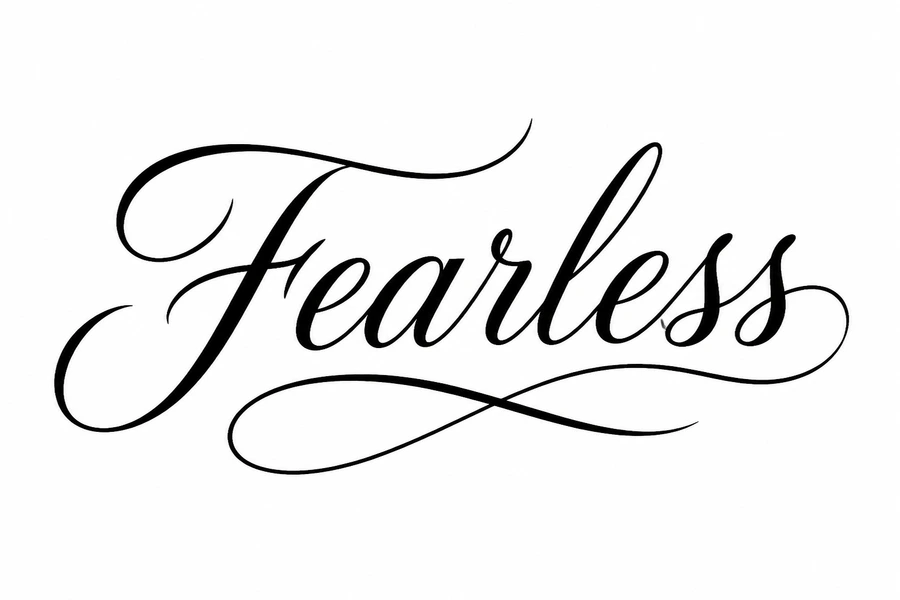
Lettering Script
A lettering tattoo concept generated from the prompt below. Open it in the generator to change the subject while keeping the lettering style locked in.
Prompt used
Elegant script tattoo lettering of the word Fearless, flowing calligraphy, black ink, clean typography tattoo design, white background
- Generated with the Lettering style preset applied
- Downloadable as a clean reference for your artist
- Edit the wording to shift subject, placement, or color
How to generate a lettering tattoo
Four steps from an idea to an ink-ready lettering concept.
Describe your idea
Type the subject, placement, size, and color notes for your lettering tattoo, or attach a sketch as a reference.
Lock in Lettering
Keep the Lettering style selected so every variation stays true to the look you want.
Generate variations
Picverce AI produces lettering concepts in seconds. Adjust the wording and regenerate to compare compositions.
Take it to your artist
Download your favorite flash and share it with a professional, who will adapt the piece for your skin and placement.
Ready to design your lettering piece?
Describe your idea in the prompt box above.
Better lettering results in fewer tries
Small prompt details make a large difference when generating lettering tattoo flash.
- Mention placement such as forearm, rib, or sternum so the lettering composition fits the body area.
- Add size notes like small wrist piece or full sleeve panel for better proportions.
- Include color guidance: black and grey only, limited palette, or full color.
- Upload a rough sketch when you already have a shape in mind, then refine it with text.
Related tattoo styles
Browse other style pages with their own example prompts and tips.
Our AI Tools
AI-powered photo enhancement, restoration, colorization, and object removal.
Loved by millions
See how creators, marketers, and developers are using Picverce AI to supercharge their workflows.
"This platform completely changed how I generate assets for my campaigns. The quality is unmatched and it saves me hours every single day."
Sarah Jenkins
Creative Director
"I've tried every AI generator out there, and nothing comes close to the precision and ease-of-use of Picverce AI. It's simply the best in class."
Marcus Chen
Lead Game Designer
"The upscaling and background removal tools alone are worth their weight in gold. A must-have tool for any modern digital business."
Elena Rodriguez
E-commerce Founder
"The speed and efficiency of Picverce AI is incredible. I can produce ten times the content I used to, all while maintaining top-notch quality."
David Miller
Content Creator
"Our ad campaigns have never looked better. The AI-generated assets perfectly match our brand style and have significantly boosted our click-through rates."
Aisha Patel
Marketing Manager
"I was skeptical at first, but this tool has completely won me over. It handles complex editing tasks in seconds that would normally take me hours in Photoshop."
James Wilson
Freelance Designer
"The image upscaler is absolute magic. It breathes new life into our older, low-res photos, making them completely usable for modern high-DPI displays."
Sophia Lee
Social Media Strategist
"Creating sprites and background assets used to be the biggest bottleneck in our workflow. Now we can rapidly prototype visual ideas without breaking a sweat."
Lucas Silva
Indie Game Developer
"The background removal tool is flawlessly accurate. It has streamlined our entire product photography pipeline, saving us thousands of dollars a month."
Emma Thompson
E-commerce Specialist
Lettering tattoo questions
Common questions about generating lettering tattoo designs with Picverce AI.
Always double-check spelling in the output and confirm with your artist before inking.