


How to turn a photo into a coloring page
How to turn a photo into a coloring page: pick a photo that works, choose a line style for kids or adults, and print custom pages for birthdays and pets.
Upload a photo, pick a line style, and get a clean black and white page you can print and colour in.
By uploading you agree to our Terms & Privacy Policy
AI-powered photo enhancement, restoration, colorization, and object removal.

Create stunning images from text prompts.
Turn a photo into a printable black and white page with clean, colorable outlines.
Every style asks for black outlines on a white background with no grey tones, hatching or fill, so each shape stays open for crayons or markers.
Thick lines for small hands, fine lines for adult coloring books.
Halloween, Christmas, Easter, birthdays and more around your subject.
Pick a line weight from toddler thick to fine line intricate, add a seasonal or themed border, or redraw the photo as a mandala, stained glass or woodcut page.
White background and closed shapes that print cleanly on A4 or Letter.
Upscale 2x, 4x or 8x before you print large.
Same pose and composition as the photo.
There is no prompt to write. Choose a style from the grid and Picverce AI draws the page from your photo.
Signed-in results stay in History for your plan period.
The same price for every style in the grid.
Use it on a phone, tablet or computer.
You keep the rights to what you upload and create.
Upload a photo above and pick a coloring style.
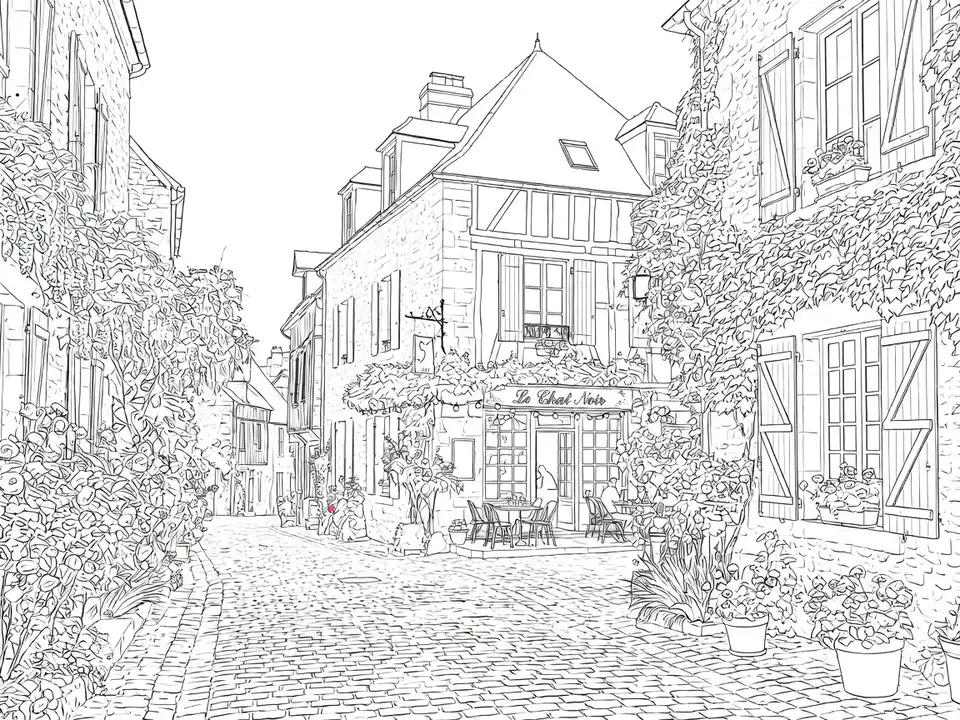
Real photos turned into coloring pages with four Picverce AI styles. Drag the slider to compare.
 Before
 After
Balanced lines on a village street. Walls, windows, shutters and plants each become their own shape to color.
Four steps from photo to printable page with Picverce AI.
Use a clear JPG, PNG or WEBP up to 5 MB. One main subject on a plain background gives the cleanest lines.
Choose a line weight, a seasonal or themed border, or an art treatment from the style grid.
Picverce AI redraws your photo as black outlines on white, with no shading or fill. Each page costs 3 credits.
Drag the slider to check the page against your photo, then download it, or upscale it first for a larger print.
Upload a photo above and choose a coloring style.
How to turn a photo into a coloring page: pick a photo that works, choose a line style for kids or adults, and print custom pages for birthdays and pets.
Making a real poster for a village market with the Picverce AI Poster Generator, including the part where the printed version needed a redo.
One Picverce AI door starts from a character or a ship and four fan art styles. The other starts from a blank prompt. Which to pick depends on your subject.
Photos, styles, printing, credits and History.
It redraws a photo you upload as a black and white line drawing on a white background. The page has outlines only, with no shading, grey tones or fill, so every shape can be colored in.
Clear, well lit photos with one main subject work best, such as a pet, a child, a car or a house. Busy backgrounds add extra lines. Photos must be JPG, PNG or WEBP and up to 5 MB.
Yes. Download the page and print it on A4 or US Letter paper. For a larger print, use the upscale button at 2x, 4x or 8x before you download. Upscaling costs 2, 3 or 6 credits.
Toddler thick lines uses very thick outlines and a few large shapes with almost no detail, so small hands can stay inside the lines. Adult detailed and Fine line intricate use thin lines and many small regions, closer to an adult coloring book. Kids simple and Classic outline sit in between.
Seasonal styles keep your subject as it is and draw themed motifs around it in the same outline style, for example pumpkins and bats for Halloween, holly and gifts for Christmas, or balloons and a cake for a birthday. The theme styles work the same way with dinosaurs, space, unicorns and more.
Each coloring page costs 3 credits, whichever style you choose. Upscaling a finished page is optional and costs extra.
A page made from a photo you own is yours to use, including on printed products you sell. You are responsible for having the rights to the photo you upload, so do not upload photos, artwork or characters you do not have permission to use.
If you are signed in, each page is saved to History, where you can open, compare and download it again. How long it stays depends on your plan: 3 days on Free, 15 days on Basic, 30 days on Standard and 90 days on Premium.