When 4x beats 8x on faces
The Picverce AI Image Upscaler hands every scale the same trimmed input, which is why 8x costs double the credits and often looks worse on a portrait.
AI ModelsThe scale menu offers 2x, 4x and 8x, and the obvious reading is that 8x is the good one. On portraits that reading is usually wrong.
The reason has nothing to do with the model being bad at faces. It has to do with what the model is handed in the first place.
Every scale starts from the same input
Before anything is sent, the AI Image Upscaler measures your file against a pixel ceiling of roughly two megapixels and resizes it down if it is over.
That ceiling exists because the processing GPU runs out of memory above it. The trim is applied at a fixed limit that does not move with the scale you picked.
So a 12 megapixel phone photo arrives at the model at around 1600 by 1200 whether you asked for 2x, 4x or 8x. The input is identical in all three cases.
What changes is only how far that same input gets multiplied on the way out.
This is the fact that reframes the whole menu. 8x is not a higher quality setting. It is the same starting material stretched across four times the area of 4x.
The trim leaves a small safety margin under the hard limit rather than sitting exactly on it, which is why a photo just over the line still gets resized.
A file already under the ceiling is passed through without that resize. Small web images therefore reach the model exactly as you saved them, which is the one case where nothing is lost on the way in.
The resize also re encodes to JPEG at high quality. It is a light touch, but it is another reason a second pass over an output is worse than a single pass over an original.
Why the extra area hurts a face
The upscaler does not find detail. It predicts what detail would plausibly sit between the pixels it was given.
On a brick wall or a fabric weave that prediction is easy, because the pattern repeats and a wrong guess still looks like brick.
Skin is the hard case. It has no repeating pattern and no hard edges, just gradual transitions that the model has to decide about.
At 4x there are enough real pixels per predicted pixel to keep those decisions anchored. At 8x the ratio tips and the model is filling more area from the same evidence.
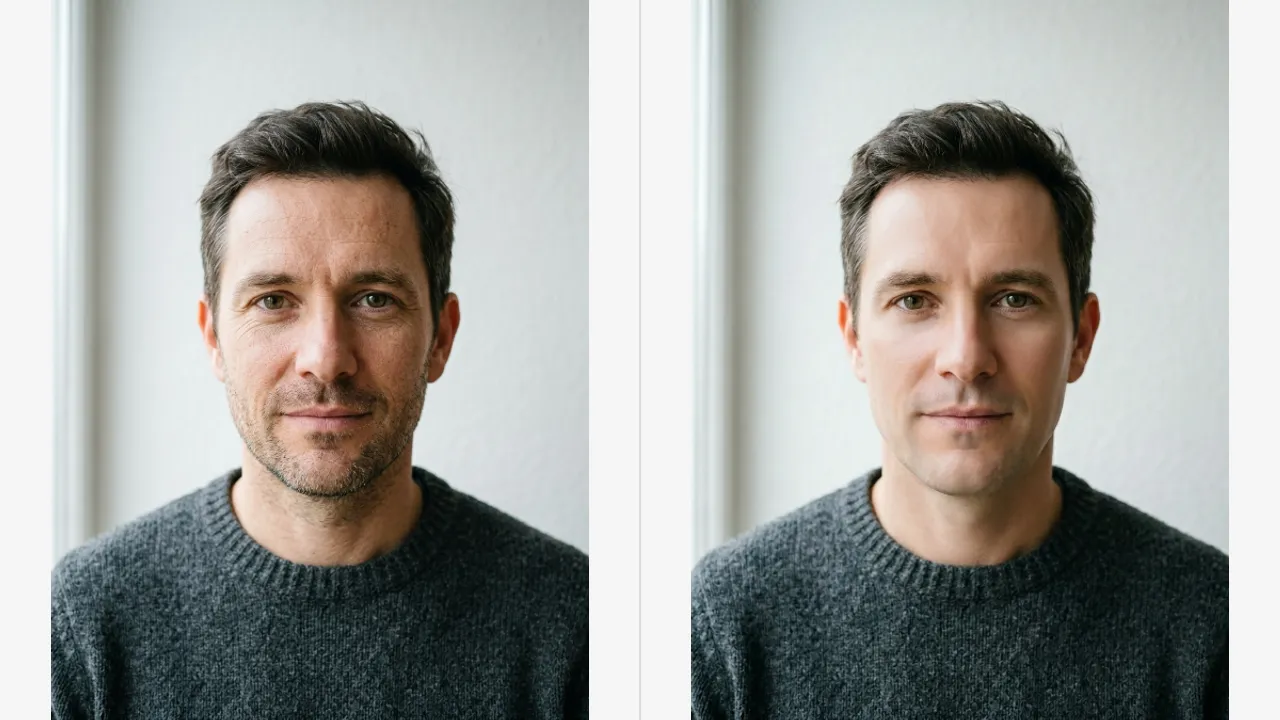
The failure mode is recognisable once you have seen it. Pores flatten into a waxy surface, the jaw picks up a drawn looking edge, and individual eyelashes merge into a dark band.
When I ran the same portrait at both settings the 8x file was four times larger and the face was worse. The jumper the man was wearing did look better, which is the tell that the model was doing fine on texture and struggling on skin.
Hair sits between the two cases. Individual strands are structure, so they usually survive, but the soft edge where hair meets forehead behaves like skin and goes plastic at the same point the face does.
Eyes are the fastest thing to check. An iris has fine radial pattern, and at 8x it often comes back as a smooth coloured ring with a highlight painted on.
What each scale is genuinely for
The scales are not a quality ladder. They are size targets, and the right one comes from arithmetic rather than preference.
- 2x at 2 credits. Small web images that need to hold up slightly larger. The safest option on any portrait.
- 4x at 3 credits. The practical ceiling for faces, and enough for most prints from a reasonable source.
- 8x at 6 credits. Texture, architecture, product surfaces and artwork. Large format output where nobody stands close.
Note the credit shape. 4x costs one more credit than 2x, while 8x costs double 4x, which is a lot to pay for a result you may discard.
If you are unsure, run 4x. Going up afterwards costs 6 more credits, and starting at 8x and disliking it costs the same 6 for nothing.
8x is genuinely the right answer on the right subject. A brick facade, a woven rug, a circuit board, a painting, anything where the pattern tells the model what belongs between the pixels.
Group photos are worth calling out as a middle case. Faces are small in the frame, so the plastic skin problem is far less visible, and 8x can be the correct pick on a photo full of people.
Getting more out of 4x
Since the input is capped, the way to a better result is a better input rather than a bigger multiplier.
Crop before you upload. A tight crop to the head and shoulders spends the whole two megapixel budget on the face instead of on a room.
That single habit changes more than any scale choice. A cropped portrait at 4x beats a full body shot at 8x on the face every time.
Clean before you scale when the source is noisy. The AI Image Enhancer at 2 credits removes grain that an upscale would otherwise enlarge along with everything else.
What that cleanup does to grain and to edges is worth knowing before you rely on it, and it is covered in what the Image Enhancer does to noise and edges.
Judge at 100 percent, on the iris and the hair at the temples. If strands still separate and the iris has pattern rather than a flat ring, the scale you chose was right.
If they do not, drop a step rather than running the same file again. A second pass reads the first pass invention as truth and commits to it harder.