How to add a Santa hat to a photo
How to add a Santa hat to a photo in a few steps, take a selfie that suits the hat, and download it square or round for your profile picture.
TutorialsA Santa hat is the quickest way to make a profile picture feel like December. The hard part is making it sit on your head instead of floating above it.
This guide uses the Christmas profile picture maker, which puts the hat on and keeps your face as it is. It also covers other ways to do it, with their limits.
The quick way step by step
- Upload a photo of yourself. JPG, PNG and WEBP all work, up to 5 MB.
- Crop it square. Drag and zoom until your face sits inside the circle guide. This step runs in your browser before upload.
- Pick the Santa hat preset and start it. One image costs 4 credits.
- Download it as a square JPG or a round PNG. Both come from the same result, so the second download costs nothing extra.
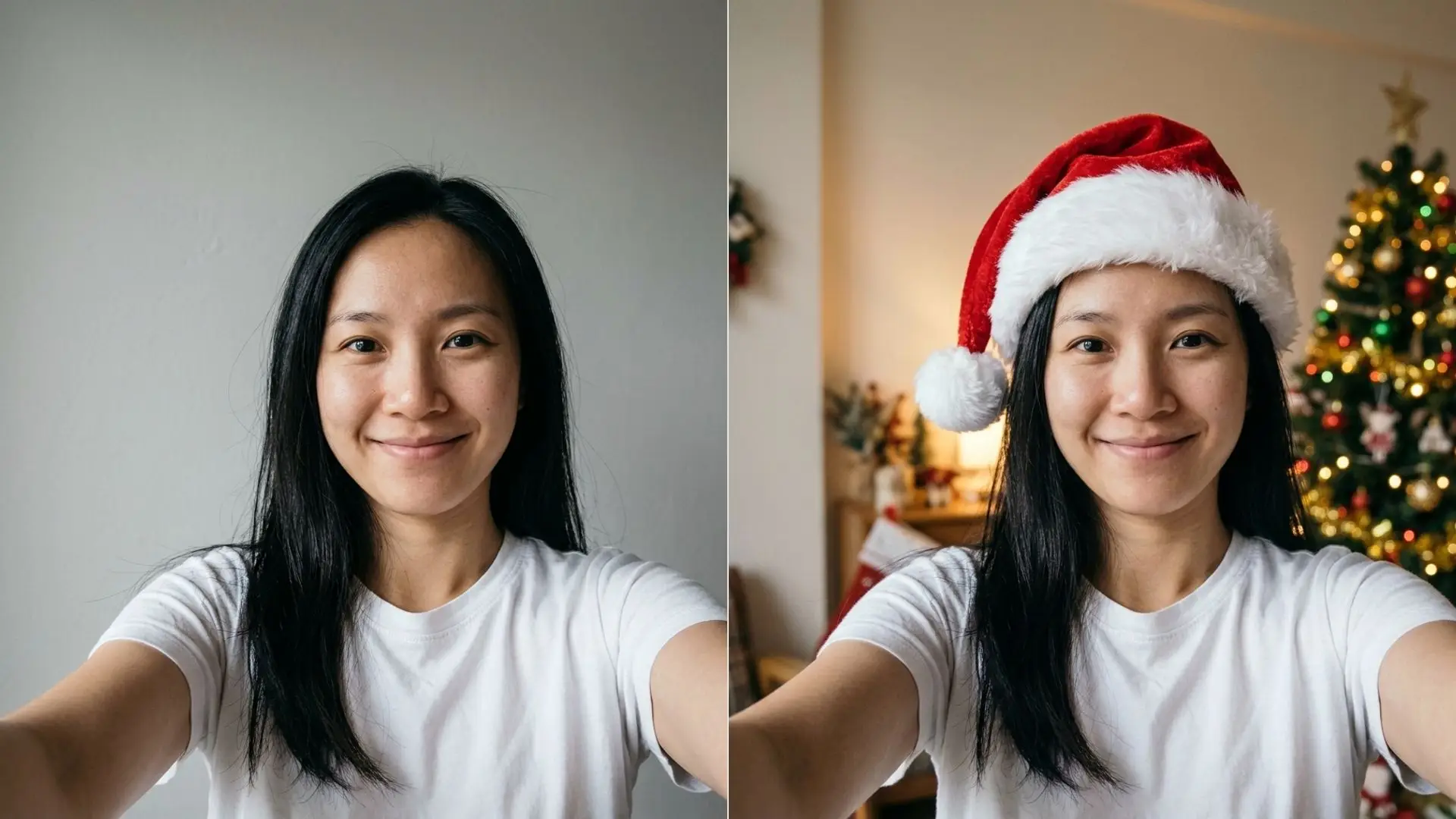
The preset puts a red and white Santa hat on your head, following your hair, and blurs a warm room with tree lights behind you.
The tool is set up to keep your face, hair, glasses and expression the same, and to keep the same head angle. A hat must not cover your eyes, nose or mouth.
Take a photo that works with a hat
The hat needs room. A selfie cropped at your eyebrows leaves nowhere to put it.
- Face the camera. A strong side angle makes the hat harder to place.
- Leave space above your head, about a hand width in the frame.
- Use even light, like a window in front of you. Hard shadows on one side look odd under a hat.
- Take off any hat or hood you are already wearing.
- Keep one person in the photo, so the tool knows whose head gets the hat.
A plain wall behind you is fine. The background is replaced with a soft festive room anyway.
If your best photo of yourself is a work headshot, starting from a clean headshot gives the hat a sharp, well lit face to sit on.
Square or round for each app
Most chat and social apps crop your profile picture into a circle. Some show a square in other places, like a profile page or a contact card.
That is why there are two downloads. The square JPG suits apps that do their own crop. The round PNG has a transparent corner, so it looks right anywhere you paste it, like a slide or a team page.
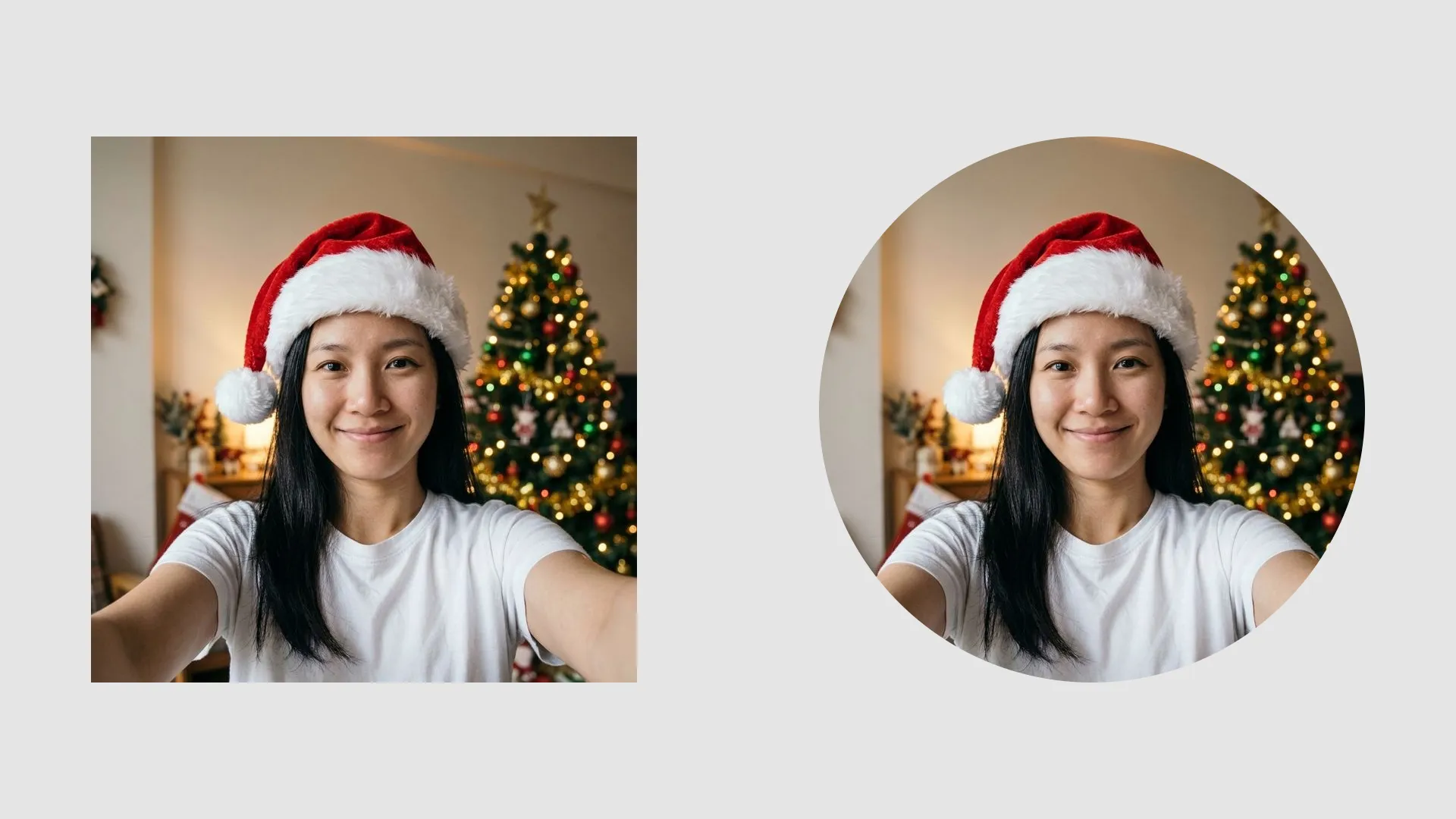
The result leaves clear space around the head on every side, so a circle crop does not cut through the hat or your hair. Check it in the round preview before you download.
Want something other than a hat? The list of Christmas profile picture ideas covers sweaters, lights and couple pictures.
If the hat does not look right
Most problems trace back to the photo you started with. Fix the photo, run it again, and the hat usually lands.
- Hat sits too low or too high: your head was close to the top edge. Crop again with more space above your hair.
- Hat tilts oddly: your head was tilted. The result keeps the same head angle as your photo, so start from a straighter shot.
- Face looks soft: the photo was small or blurry. Use the original file from your phone gallery, not a copy from a chat app.
- Wrong person got the hat: there were two faces in the frame. Crop to one face before upload.
Every new run costs another 4 credits, so it pays to fix the photo first. The Free plan gives you 10 credits a day, enough for two tries.
When you are signed in, each result stays in your History, from 3 days on Free up to 90 days on Premium. You can come back and download the round version later without running it again.
Other ways and their limits
There are other ways to add a Santa hat, and they are worth knowing about.
- Stickers in camera and story apps: quick and fun, but the hat often sits at the wrong angle, and it may not save as a normal photo file.
- Layers in a photo editor: full control and free, but you have to cut out the hat, scale it, and match the light by hand.
- Hat overlay websites: fast, but the hat is a flat cutout pasted on top, so it rarely follows your hair.
The preset approach gives you a hat that sits on your head with matching light, in exchange for credits. If you only want a joke sticker for one story, an app sticker is the faster choice.
For a stylized avatar instead of a photo, the steps in a profile avatar from one headshot show the anime route. To use the hat photo on a family card, the Christmas card photo ideas list has poses that match.