What to put on a holiday hours sign, with examples
What to put on a holiday hours sign: business name, each date with its weekday, hours or Closed, and when you reopen. With 4 example signs to copy.
MarketingA holiday hours sign has one job. A customer walks up, reads it in a few seconds, and knows whether you are open.
Here is what to put on it, wording you can copy, and the mistakes that send people to a locked door. Every example was made with the holiday hours sign maker, which fills in the weekday for each date you pick.
What every holiday hours sign needs
- A clear title, such as Christmas Hours or Closed for Christmas.
- Your business name, so the sign still makes sense in a photo someone shares.
- Each day that changes, with the weekday and the date.
- The opening and closing time for each of those days, or the word Closed.
- When normal hours come back.
- A phone number or website for questions.
Only list the days that differ from your normal week. A sign with 12 rows takes too long to read at a door.
Write the times the same way your regular hours sign does. If your door already says 9:00 AM to 6:00 PM, the holiday sign should use the same style, so people can compare the two at a glance.
A short thank you line at the bottom is optional, but it turns a notice into a friendly message from a shop people like.
The maker allows up to 7 rows, which covers the week between Christmas Eve and New Year's Day. The example signs in this post use 2 to 4 rows. The maker shrinks text to fit the space, so fewer rows print larger.
Holiday hours sign wording you can copy
Christmas hours, for a shop with short days:
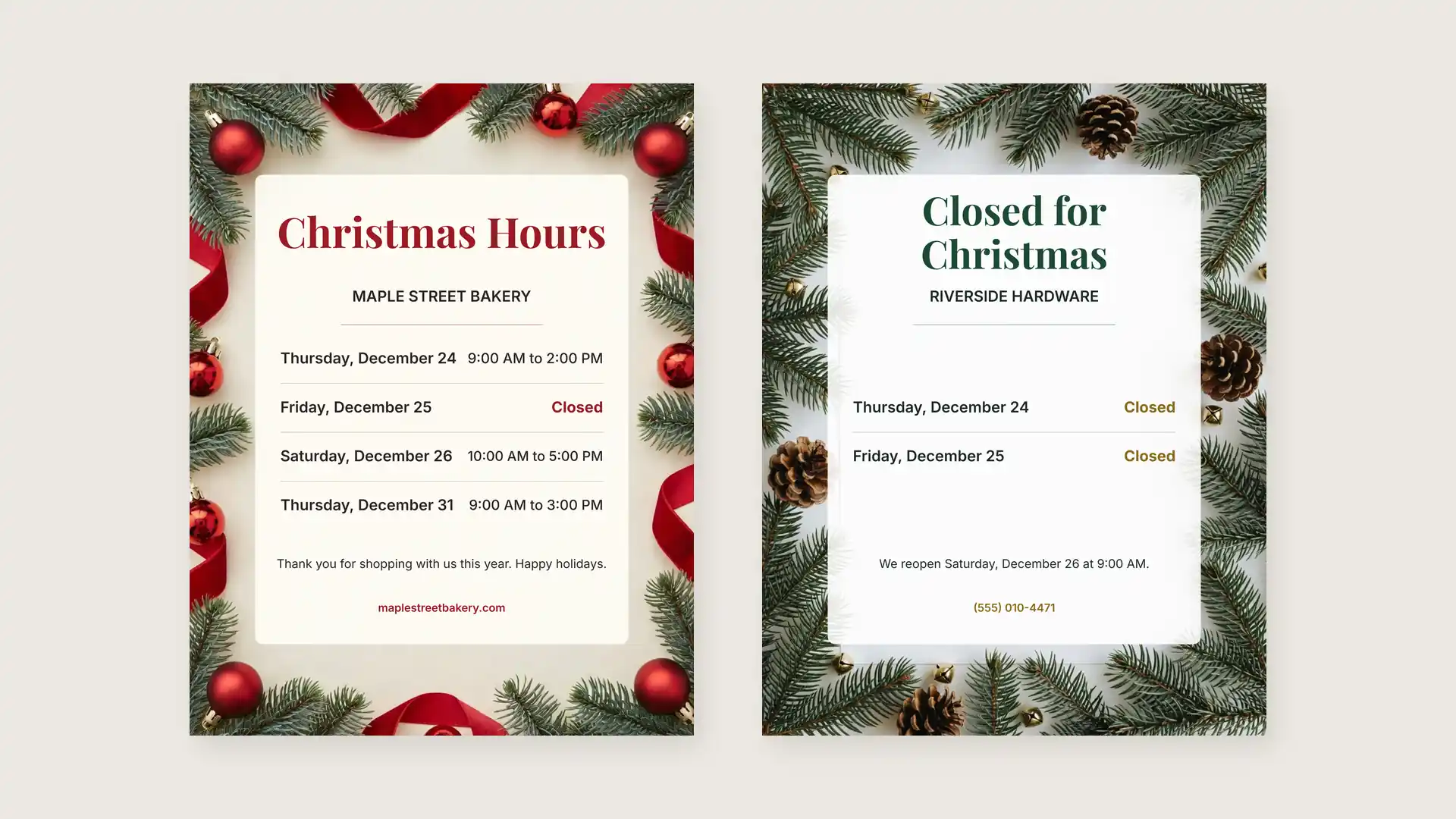
Christmas Hours. Thursday, December 24: 9:00 AM to 2:00 PM. Friday, December 25: Closed. Saturday, December 26: 10:00 AM to 5:00 PM. Thank you for shopping with us this year.
Closed for Christmas, for a business that shuts for two days:
Closed for Christmas. Thursday, December 24: Closed. Friday, December 25: Closed. We reopen Saturday, December 26 at 9:00 AM.
New Year, for a cafe:
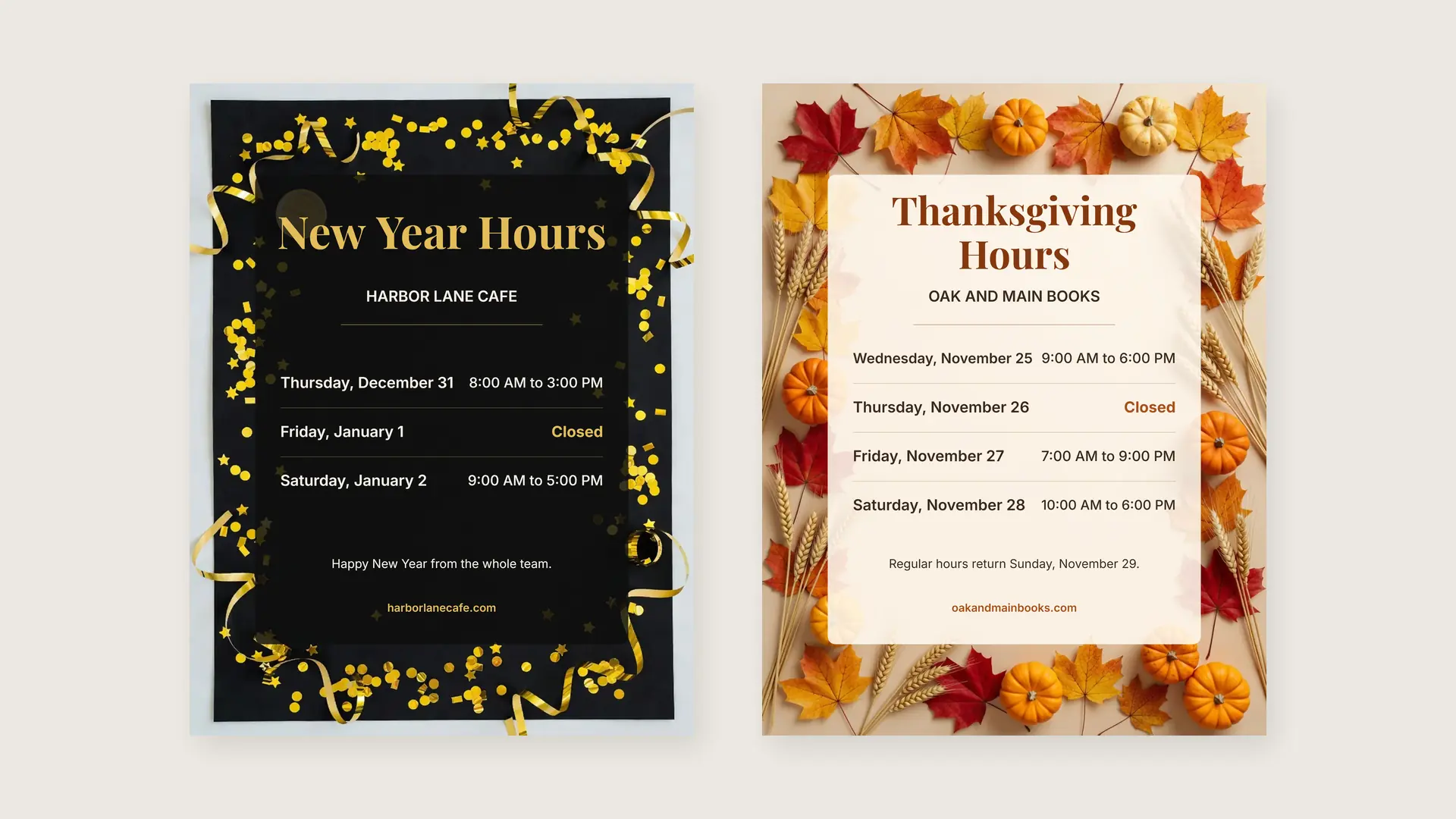
New Year Hours. Thursday, December 31: 8:00 AM to 3:00 PM. Friday, January 1: Closed. Saturday, January 2: 9:00 AM to 5:00 PM. Happy New Year from the whole team.
Thanksgiving, for a bookshop:
Thanksgiving Hours. Wednesday, November 25: 9:00 AM to 6:00 PM. Thursday, November 26: Closed. Friday, November 27: 7:00 AM to 9:00 PM. Regular hours return Sunday, November 29.
A closure that is not a holiday, such as stock taking:
Closed for Inventory. Monday, January 4: Closed. We reopen Tuesday, January 5 at 10:00 AM. Sorry for any trouble.
Mistakes to avoid on a holiday sign
The most common mistake is a weekday that does not match the date. This season, December 25, 2026 and January 1, 2027 both fall on a Friday. A sign that says Thursday, December 25 makes people doubt the whole sign.
The maker writes the weekday from the calendar, so you only pick the date. If you write a sign by hand, check each date against a calendar before you print.
- Mixing 9am, 9:00 and 21:00 on one sign. Pick one time style and keep it.
- Leaving out when you reopen. People want to know when to come back, not only when you are closed.
- Text too small to read from the door. Titles should read from a few steps away.
- Forgetting the year on a sign that stays up past New Year.
Where to put the sign and when
Put the sign on the door at eye level, and a second copy by the register so regulars see it while they pay. A week before the first changed day is a good time.
Your door is not the only place people check. Update your hours online too, on your website and any map listings.
On Google, a Business Profile has a Special hours setting for holidays and events, so your regular hours do not change. Google's help page explains that you pick the date, set the hours or keep Closed checked, and save.
If you are also running a holiday sale, a separate poster keeps the hours sign clean. Mixing the two on one sheet makes both harder to read.
For the sale itself, you can make a holiday sale poster with AI. The layout tips in this poster layout guide apply to both.
If your shop is a drop-off point for a toy drive this year, put that flyer next to the hours sign. Here are some toy drive ideas for the office and school if you are organizing one.
Make the sign in a minute
- Open the maker and pick a title, or type your own up to 32 characters.
- Add your business name and up to 7 dates. The weekday fills in for each.
- Set the hours for each day or tick Closed.
- Add a note, such as when you reopen, and a phone number or website.
- Pick one of 6 backgrounds and US Letter or A4, then print, save as PDF, or download a PNG for your social pages.
The sign is drawn in your browser, and it uses no credits. Make one for each holiday.
Next year, the dates move to new weekdays, so make a fresh sign instead of printing the old file. Picking the same dates again takes a minute, and the weekdays come out right.